If you’re looking to invest in cryptocurrencies, you may have come across Cardano. In this article, we take a closer look at Cardano and its native coin, ADA and decide whether it makes for a good investment looking forward.
Cardano has been one of the few cryptocurrencies that have consistently been in the top 10 cryptocurrencies by market cap.
Founded by ex-Ethereum co-founder Charles Hoskinson the often maligned coin has many advantages that are often overlooked.
Reliability
Cardano
It’s often forgotten that Cardano is extremely reliable. The Cardano blockchain has had a total of zero outages in over five years.
If one of the criteria for investment in a chain is reliability, Cardano is certainly up there with the best.
Smart Contracts
Critics of the Cardano blockchain often point out that progress is often slow and important developments such as smart contracts have taken exceptionally longer than other chains to implement.
It’s true that Cardano does take its time with regard to adding new functionality to the chain. However, the care Cardano takes in ensuring only fully tested upgrades to the system are implemented is a testament to the professionalism of the Cardano software developers.
The implementation of smart contracts is paramount to the development of decentralised finance applications (DeFi).
The creation of such platforms means users can utilise applications without the need for middlemen or centralised entities controlling their ADA.
All transactions are handled by pre-programmed smart contracts that carry out the required instructions without human interaction.
Despite Cardano implementing smart contracts following the Alonzo hard fork in 2021, many outside the Cardano community believe that this functionality is missing from Cardano. That is simply not the case.
If DeFi capability is something that makes a blockchain investible, Cardano certainly has that functionality locked down.
Decentralised Exchanges (DEXs)
Another criticism often directed at Cardano is a lack of decentralised exchanges or DEXs. Having functional DEXs on a blockchain is paramount since it allows users to swap tokens and this in turn increases liquidity in the chain and its associated native tokens.
Unfortunately, Cardano did take a relatively long time to launch its first DEX and as such that hampered the perceived usefulness of the chain.
However, since the launch of smart contracts in 2021 several high-quality DEXs have launched including Minswap, MuesliSwap, SundaeSwap and Wingriders amongst more.
The issue of a lack of DEXs has now been rectified and Cardano has a thriving network of DEXs. Some like MuesliSwap are even collaborating with wallet developers to include in wallet swapping of native tokens.
Features like this can only make Cardano easier to deal with for the end user.
The whole point of blockchain is to create a decentralised system, as such any exchanges would need to be decentralised.
Decentralisation ensures that issues with users getting locked out from accessing their funds as seen in the recent centralised exchanges, Celsius and FTX dramas are unlikely unless there is a major hack of some sort.
If a choice of functional DEXs is a requirement for investing in a blockchain, Cardano certainly has that now across several popular platforms.
Cardano the “Ghostchain”?
Another criticism levelled up against Cardano is that of being a “Ghostchain'” or a blockchain that does not offer many functional or useful projects.
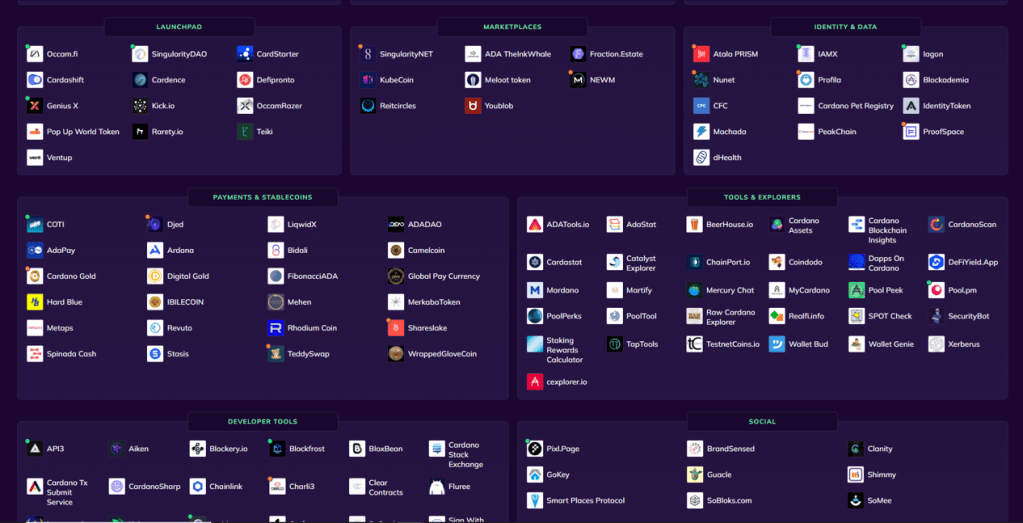
Well, if we are looking at the number of active projects on Cardano we can say that Cardano is definitely not a “Ghostchain'” as there are over 1000 projects building on Cardano.
Sites such as CardanoCube show that Cardano offers a wide range of projects from crypto wallets to NFT projects to Launchpads all looking to develop and grow within the Cardano ecosystem.
It should also be added that Cardano and IOHK also provide their own project accelerator “Project Catalyst” that directly funds promising projects. Successful projects are voted on by ADA holders.
The Price
Cardano has dropped from all-time highs of over 3 dollars, to just over 30 cents at the time of writing (Jan 2023).
However, all cryptocurrencies have seen the impact of a dramatic bear market and the impact of large-scale bankruptcies and scandals within the crypto industry has not helped.
Cardano has a loyal following of supporters and the chain has several network improvements in the pipeline including an upgrade that will allow for easier integration with the Bitcoin and Ethereum networks.
The SECP256k1 support will allow Cardano to be an “internet of blockchains” and is a significant addition to functionality.
With these factors in mind, the current low price of Cardano is probably temporary and is likely to go up in future given the successful launch of the scheduled upgrades.
Cardano Staking
One of the key use cases for Cardano and ADA is the ability to stake your ADA and earn passive income.
Staking is a method of delegating ADA to a Stake Pool Operator who helps to process transactions on the network by running nodes on the blockchain.
The operator gets rewarded every 5 days (Epochs) should he manage to produce a complete block on the chain.
The great thing about Cardano is users do not have to lock up their ADA when they stake. Instead, they simply delegate their ADA and they are free to spend their ADA as they wish.
Users are rewarded at the end of each epoch if their chosen stake pool completes a block within that period.
This really is a no-brainer for all ADA holders and offers a relatively risk-free method of growing their ADA passively.
This system is innovative and useful as it means users can support decentralisation in the network without losing control of their ADA.
It also means that Stake Pool Operators and users can earn passive income from the network without unnecessarily risking their ADA to a third party.
All rewards are distributed automatically by the network.
Final Thoughts
Cardano certainly has its detractors but if we look at Cardano dispassionately we can clearly see that it’s a top-level contender in crypto and that much of the negativity with Cardano is for the most part unjustified.
As with all crypto investments there are risks associated but not any more than other crypto projects.
In fact, due to its reliability, its robust staking system and its loyal followers it’s probably one of the less risky options out there.
Disclaimer: This article is not financial advice. Crypto can fall dramatically in value . Remember to do your own research.
Do you want to earn passive income on your money? Get some ADA and support our stake pool, the Pop Up World Stake Pool (PUWSP). Your ADA is not locked and your rewards are distributed automatically. You do not need to send us anything to stake. Start earning today!
You will also, be helping us fund our start-up launchpad which will be launching exciting projects and start-ups in future.
***Disclaimer: This article is not financial advice and is given for informational and entertainment purposes only. Readers should conduct their own research and not invest more than they can afford to lose. Crypto is extremely volatile, and as such can drop in value considerably without notice.Pop Up World has a global presence and is not specifically targeting any jurisdiction with its content. Any crypto references are not intended for UK businesses or consumers.You should always seek legal advice to understand if the use or investment in crypto is allowed in your jurisdiction.
The Pop Up World Token is designed specifically for entrepreneurs, to store value and to utilise on our platform Pop Up World. Join the revolution in financial freedom today.
The Pop Up World Token on Cardano
Get the token on Cardano Decentralised Exchanges (DeXs), MuesliSwap, SundeSwap, Wingriders and Minswap. Or click the link here:
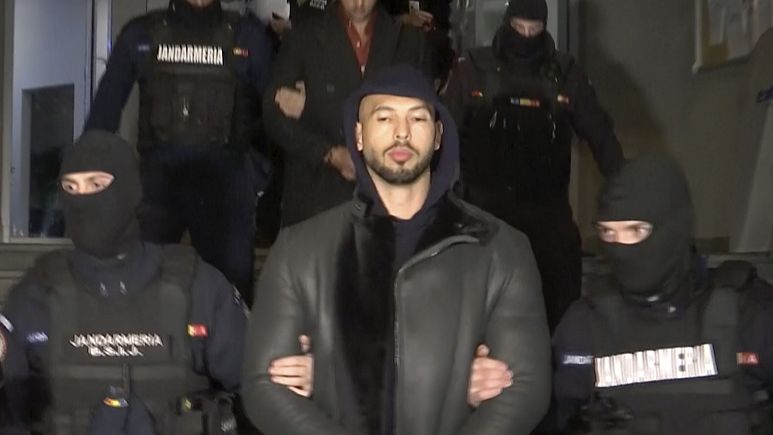
Andrew Tate is a controversial figure in the world of social media, business, self-improvement, and personal development. But recently, he was arrested on alleged rape and people trafficking charges. In this article, we look at what we can learn from the disgraced Andrew Tate.
Check your Business is Legitimate
Andrew Tate – Check if your business is legitimate
As an entrepreneur, it’s essential that the business you are running is legitimate. That means your desired line of business should be legal. Andrew Tate has been arrested due to an alleged webcam business in which he recruited girls to perform online acts under false pretences. If true, he could be sentenced with sex trafficking.
What can entrepreneurs learn? Double-check your business idea meets all legal laws in your jurisdiction. Talk to a lawyer or expert in your field. Don’t let a lack of funds prevent you from talking to someone about the legalities of your business. Many lawyers will give you a free consultation for thirty minutes. Ensure you are registered for all required permits and meet all local business registration requirements.
Starting a business even inadvertently that does not adhere to local laws, could at best mean a fine or at worst jail time. Please do your research and find out if there’s anything you’ve missed about your business.
Sort out your Taxes
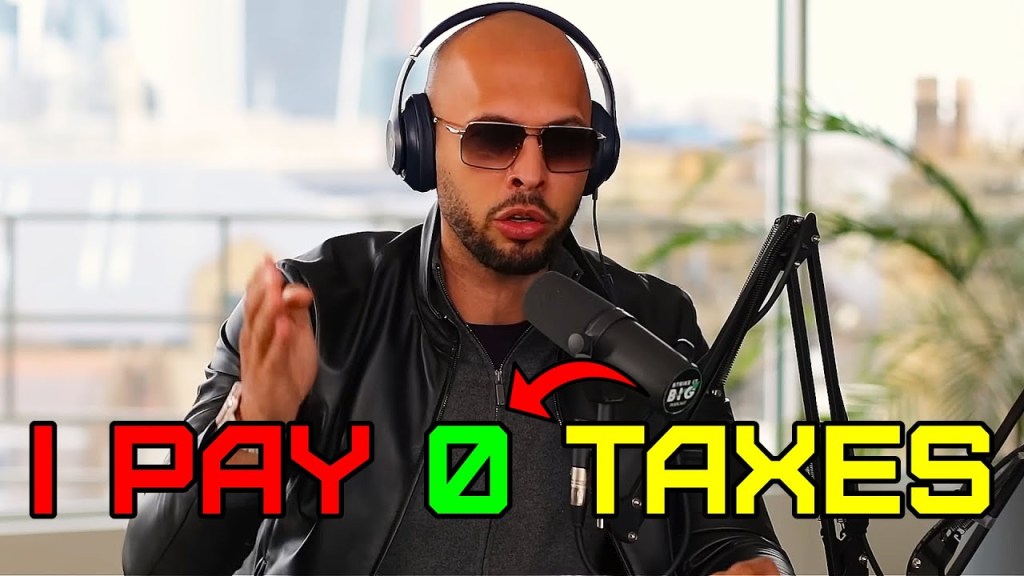
Andrew Tate – zero taxes
Don’t start your business thinking you can avoid paying taxes for a bit while you grow. Andrew Tate, allegedly set up his webcam business to avoid taxes by accepting payments in Bitcoin.
What can entrepreneurs learn? Getting paid in Bitcoin or any other cryptocurrency does not mean you can avoid paying taxes! You will have to pay tax on your earnings and/or profits in most countries.
Consider setting up a legal entity, such as a LTD company in the UK or LLC in the US to run your business. By doing this you are ensuring it is the business and not you as an individual that is liable for taxes due on your business profits.
Ensure you keep accurate business records and file any necessary annual accounts to avoid fines and late filing fees.
Act Ethically
Andrew Tate – Act ethically
Business ethics is not just a “nice to have”. Andrew Tate is accused of coercing young females into working for him in the sex industry. Whether true or not, the act of threatening someone to join your business activity is unethical by itself, even if we put aside the legal implications of that activity.
What can entrepreneurs learn? Be honest in your business dealings. Don’t lie or threaten to get people on board with your idea. Your promises can legally bind you, so if you lie, you may be creating a fraudulent contract that you could potentially be sued for.
See our previous article on verbal agreements here:
Having good business ethics will ensure you will not be storing up large numbers of disgruntled customers/associates who may at some time in the future attempt to sue you.
Keep the Ego in Check
Andrew Tate – Keep the ego in check
As you progress in business, ensure you remain balanced and level-headed. The boastful and bombastic Andrew Tate broadcasted to thousands via YouTube all the intricacies of his webcam business, most of which will probably be used in court to attempt to convict him.
What can entrepreneurs learn? Don’t go on public forums, discussing the fine details of how your business works without first thinking about the legal implications. Boasting about your success is never a good thing as it usually attracts the wrong kind of attention.
Anything you say that could be deemed controversial should include disclaimers to make the audience aware that what you are saying should not be taken as gospel. Try and bear in mind that everything you post online may be dredged up years later.
Of course, anything that could be deemed as legal or financial advice should come with its own disclaimers.
Fast Money Does Not Exist
Andrew Tate – Fast money does not exist
Andrew Tate is consistently peddling the fast money, quick gains pitch. Unfortunately, the end result of get-rich schemes is often a very sharp fall back down to earth.
What can entrepreneurs learn? Unfortunately, the lure of quick gains can cause many to throw the legal rule book aside but this is a huge mistake.
Creating a sustainable business with regular predictable income is what you should be striving for. A business that is based on an elaborate scheme may work for a while but will evaporate quickly once people realise it’s just hot air.
It’s highly likely that anything that feels like a dead cert to make money is also likely to be regulated, so do your checks to ensure you are not breaking any local laws.
This article should not be used as a substitute for professional legal advice. You should always seek the advice of a qualified professional in your jurisdiction.
If you enjoyed this article please remember to like and subscribe for regular entrepreneur news on Pop Up World. Feel free to visit us at https://www.popupworld.co.uk
Thanks!
Processing…
Success! You're on the list.
Whoops! There was an error and we couldn't process your subscription. Please reload the page and try again.
With real world Artificial Intelligences such as Open AI’s Chat GPT-3 trending in the media, we thought we would take a look at the top ten movies that feature an AI, with a small twist…This article is entirely composed by the AI itself.
We asked the AI, “Write me a list of top 10 artificial Intelligence movies with an intro about Chat Gpt3 and a brief article about real world uses”, Here’s what we got back:
Here’s a list of the top 10 artificial intelligence movies, along with a brief introduction about Open AI’s GPT-3 and a short article on real-world uses of AI:
GPT-3 (short for “Generative Pre-trained Transformer 3”) is an AI language model developed by Open AI. It is capable of understanding and responding to natural language input, and can generate human-like text in response. GPT-3 has been used in a wide range of applications, including chatbots, language translation, and text summarization.
The Terminator (1984) – James Cameron’s classic sci-fi film about a deadly robot assassin sent back in time to kill Sarah Connor.
The Terminator
2. Blade Runner (1982) – Ridley Scott’s neo-noir film about a future society where highly advanced androids, known as “replicants,” are used as slave labor.
3. The Matrix (1999) – The Wachowskis’ groundbreaking film about a simulated reality created by machines to keep humanity enslaved.
The Matrix
4. 2001: A Space Odyssey (1968) – Stanley Kubrick’s epic sci-fi film about a sentient computer, HAL 9000, that becomes self-aware and begins to question its programming.
5. AI: Artificial Intelligence (2001) – Steven Spielberg’s film about a highly advanced android boy who longs to become human.
6. Ex Machina (2014) – Alex Garland’s psychological thriller about a reclusive billionaire inventor who creates an advanced AI in the form of a beautiful robot.
Ex-Machina
7. Her (2013) – Spike Jonze’s romantic science fiction film about a man who falls in love with a highly advanced AI in the form of a virtual assistant.
8. Transcendence (2014) – Wally Pfister’s sci-fi film about a scientist who creates an AI that becomes self-aware and begins to question its purpose.
9. I, Robot (2004) – Alex Proyas’ film about a detective who investigates a crime committed by an advanced robot, leading him to question the nature of AI.
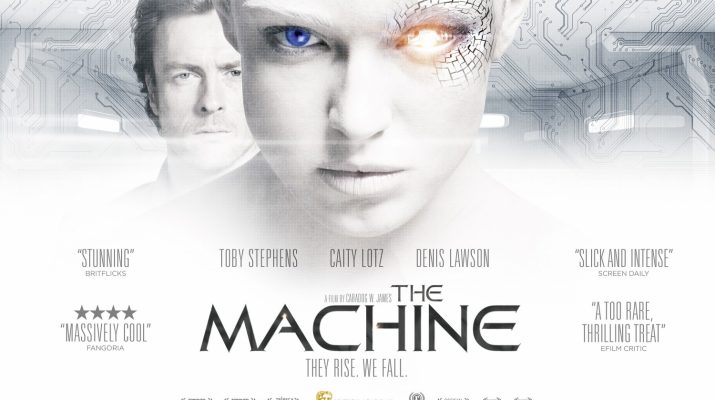
10. The Machine (2013) – Caradog James’s sci-fi film about a secret government program to develop a highly advanced AI for use in warfare.
The Machine
AI technology has become increasingly prevalent in our daily lives, with applications in areas such as healthcare, finance, transportation, and manufacturing. In healthcare, for example, AI is being used to analyze medical images and assist in the diagnosis of diseases such as cancer. In finance, AI is being used to detect fraud and improve the efficiency of trading algorithms. In transportation, self-driving cars are being developed using AI technology. And in manufacturing, AI is being used to optimize production processes and improve the quality of products.
Overall, AI is proving to be a powerful tool that has the potential to improve many aspects of our lives, and its impact will likely only continue to grow in the coming years. However, there are also concerns about the potential negative impact of AI, particularly in areas such as job displacement and privacy, and it is important to carefully consider these implications as we continue to develop and implement these technologies.
Final Thoughts(Human Commentary)
AI is a powerful tool that can be utilised by small businesses right now, not sometime in the distant future. All the movies listed above have now effectively become a distinct reality. Equally amazing and slightly scary at the same time.
Check out the illustrated screenplay Virtual Heaven (Back To Reality) by Graham Jules. All the illustrations in the book are created by AI. This is the first feature screenplay to be illustrated by AI.
A Scintillating Sci – Fi Action Thriller – Original Illustrated screenplay format.
A grieving mother and husband decide to bring back their daughter through genetics. Unexpected consequences unfold as a billionaire lab owner exerts control, unleashing forces that threaten her motherhood and the fabric of society…
If you enjoyed this article please remember to like and subscribe for regular entrepreneur news on Pop Up World. Feel free to visit us at https://www.popupworld.co.uk
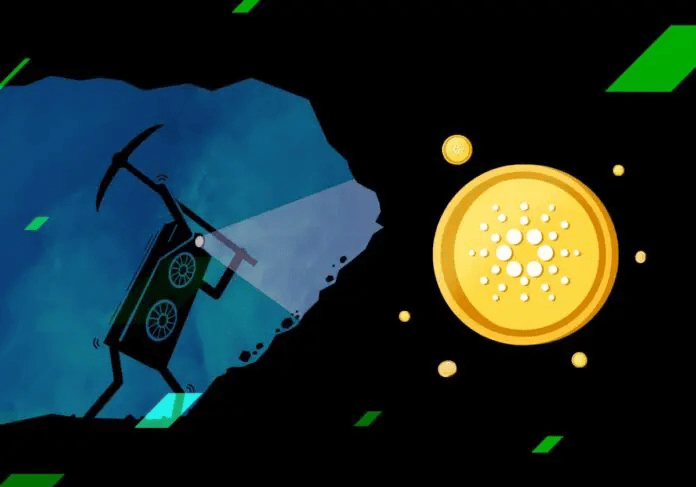
(Image source: Stormgain.com). Cardano is a blockchain cryptocurrency, its native token being ADA. In this article we take a practical, step-by-step look at how we can set up nodes on the blockchain, often called a stake pool to earn ADA rewards.
Unlike other blockchains there is no mining as such on Cardano, instead we have staking. The concept behind a stake pool on Cardano is relatively straightforward, users delegate their ADA to stake pool operators who in turn receive rewards for running the nodes and verifying transactions. The unique thing about Cardano is that users do not need to send or lock up their ADA to node operators. Their ADA remains in their wallets and can be spent at any time.
Rewards are sent automatically by the network and the system offers a unique opportunity for both users and stake pool operators to help in strengthening the network via decentralisation and in return receive passive income.
This article is designed for beginners but you should have some basic knowledge of Ubuntu/Linux and some of the commands in order to manoeuvre the process. Setting up a stake pool is not difficult but there are many steps that need to be followed precisely to avoid running into trouble.
You will also need to find a hosting provider to run the nodes on (options provided at the end of this article), minimum requirements that worked for me are as follows:
You will need 3 separate servers:
Cloud VPS 16GB running Ubuntu (20.04 64 bit) with 100GB storage and 4 core or higher CPU.
Anything less than 16GB did not work for me.
You will also need a fresh basic laptop that has not been connected to the internet. We will use this as an ‘air-gapped’ machine to verify transactions and to sign certificates to launch your stake pool.
Also, I used a Windows laptop to connect to the virtual servers and launch the stake pool but Mac should work if you download the appropriate software for your machine.
So here goes…
Initial setup
You will need to download the Ubuntu terminal on your laptop so you can access the virtual servers.
Download WSL(Windows Subsystem for Linux) for Windows from the Microsoft store
Download Ubuntu Terminal 20.04 from the Microsoft store
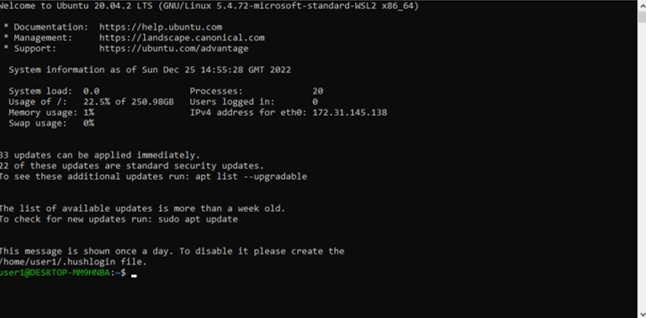
Once you have installed both, log into your Ubuntu terminal. It will look something like this:
How to create a stake pool on Cardano -ubuntu terminal
We will use this terminal to connect to your virtual servers and issue commands to launch your Cardano nodes and stake pool.
Create ssh key in ubuntu terminal enter the following:
ssh-keygen -t rsa -b 4096
Generating public/private rsa key pair.
Enter file in which to save the key (/home/user1/.ssh/id_rsa): /home/user1/.ssh/yourfilename-ssh
Enter passphrase (empty for no passphrase):******
cat /home/user1/.ssh/yourfilename-ssh.pub
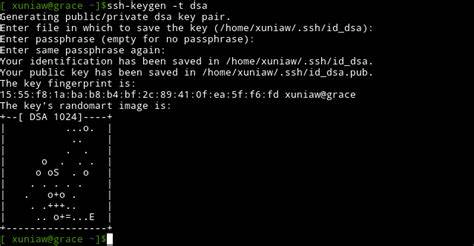
You should see the keys randomart image – it will look something like this:
How to create a stake pool on Cardano -ubuntu terminal – randomart
cat /home/user1/.ssh/yourfilename-ssh
will print your ssh key
Setting up the Virtual Servers
When you get a hosting provider you will be given the ip addresses of your server.
Keep one as your block producer ip (do not make this ip public)
Write down your relay1 ip >>xx.xxx.xx.001
Write down your relay2 ip>>xx.xxx.xx.002
Write down your production ip>>xx.xxx.xxx.003
**Remember your Production relay IP is Private!***
Access your 3 Virtual Servers from the Ubuntu Terminal in 3 separate windows using the following commands:
To prepend the required PATH variable to $HOME/.bashrc, type P
When prompted to install haskell-language-server (HLS), type N
When prompted to install stack, type N
Press ENTER to proceed.
When GHCup finishes installing GHC and Cabal, type the following commands to reload your shell profile, and then confirm that GHCup installed correctly:
source $HOME/.bashrc
ghcup –version
If all is good you should get the The GHCup Haskell installer, version number below installed on your machine –
Edit <UserValue> and <NodeHomeValue> values – Where user value is your Username (type>> echo $USER) and <NodeHomeValue> is your Home directory path (type >>echo $HOME_USER)
Cntrl X to exit editor
Y to save
<Enter> to finish
move the cardano-node.service file to the folder /etc/systemd/system and set file permissions, type:
If you get stuck at ‘starting…’ for some time in gLiveView you may have skipped something, go back and re-check or
Try:
Stop the Cardano Node –
In cardano-my-node directory:
sudo systemctl stop cardano-node
Delete db directory –
rm -r db
start cardano node again
sudo systemctl start cardano-node
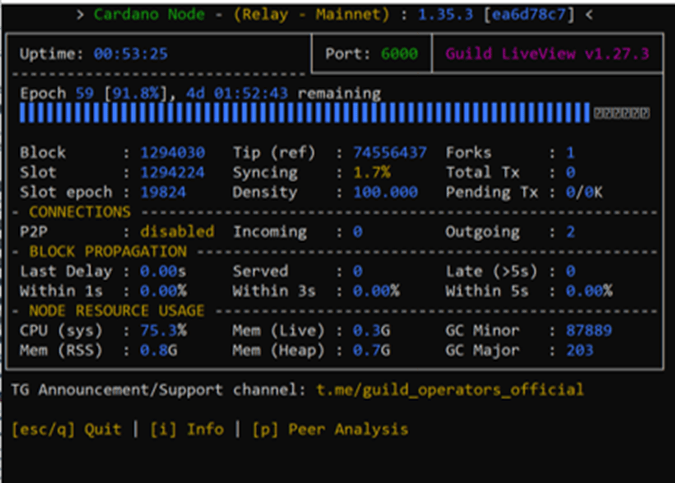
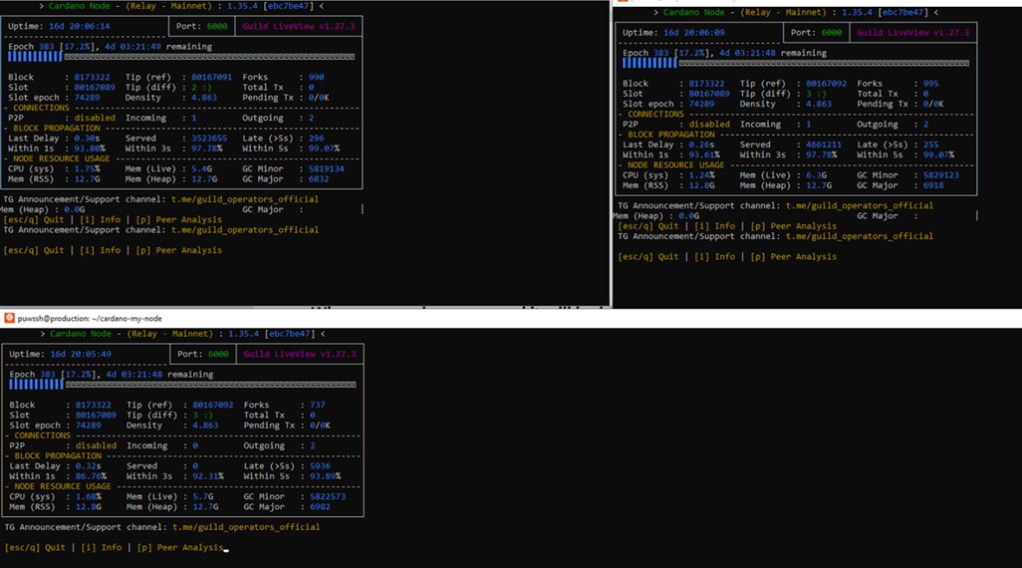
Monitor with gLiveView
./gLiveView.sh
When your nodes are synced, it will look like this:
CONGRATULATIONS!!! YOUR NODES ARE SYNCED
Air-Gapped Machine
You will need an offline “air-gapped” machine to create the keys for your stake pool. A basic windows laptop will be ideal.
The machine should not have been connected to the internet for any length of time to avoid keylogging, malware etc. The air-gapped machine needs to have:
WSL (Windows Subsystem for Linux)
Ubuntu
These can be downloaded from the Microsoft store as seen at the start of this guide.
On your air-gapped laptop:
Download WSL from the Microsoft store
Download Ubuntu 20.04 from the Microsoft store
—————————————————————-
Copy the Cardano cli binary to your air gapped machine. You will need a usb stick to transfer.
**Back to your virtual machine.On your block producer Node
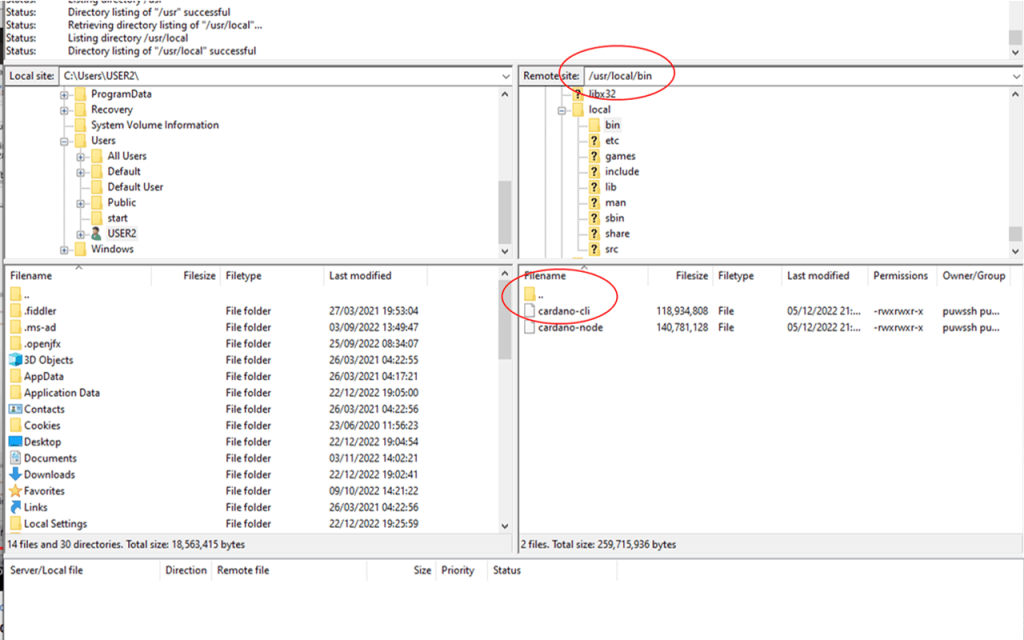
>>cd /usr
>> cd local/bin
Type ls
You should see the cardano-cli file
We need to copy this file to USB and then copy to our air gapped machine.
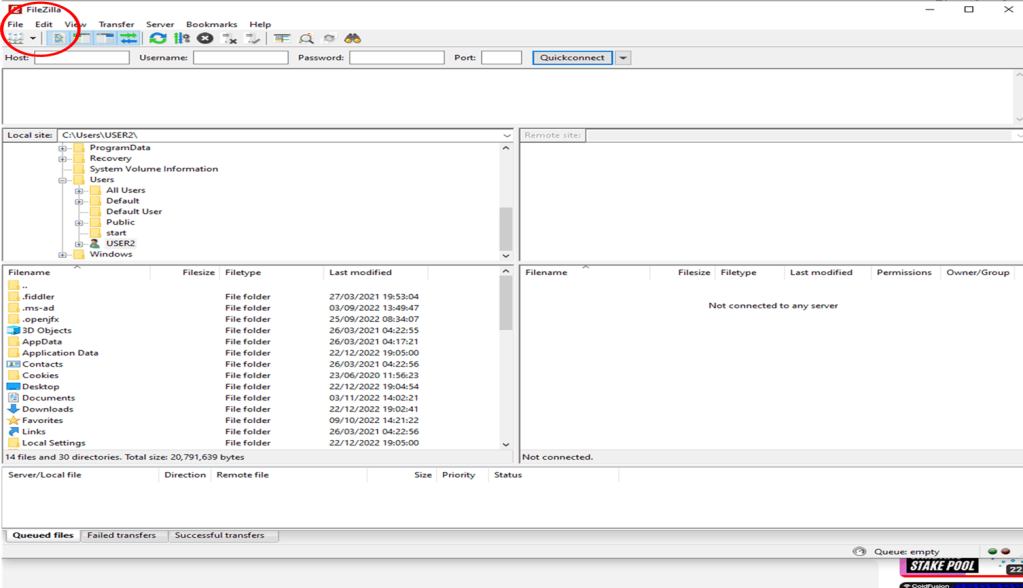
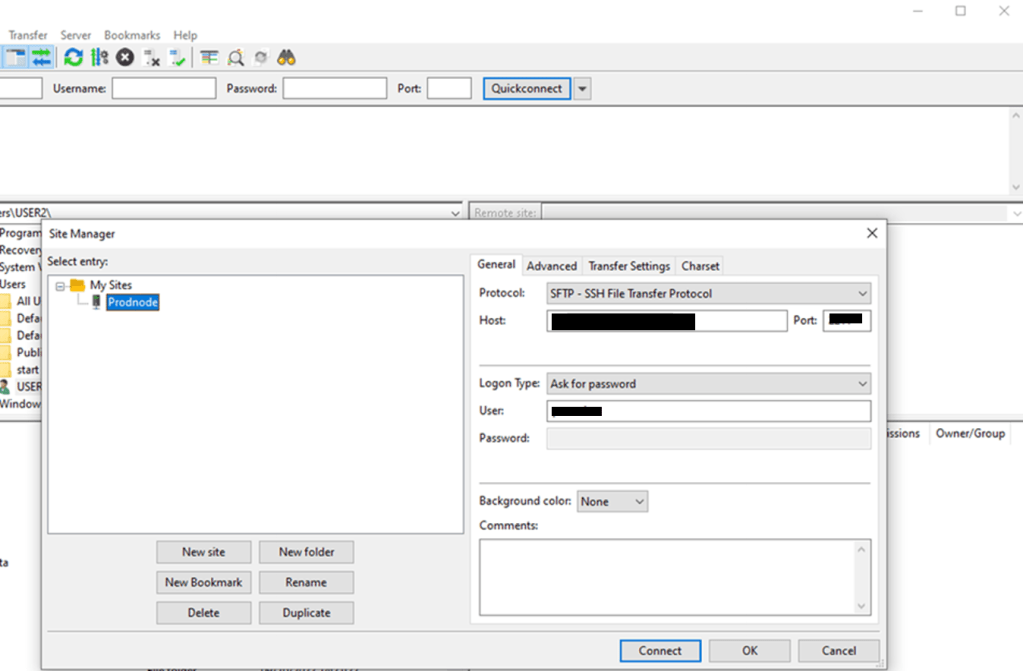
In your Windows browser on your main machine download Filezilla from:
Back on your block producer node locate the 4 files below for libsecp256k1 and copy them to the folder you just created on the air-gapped machine via the USB stick.
/usr/local/lib/libsecp256k1.a
/usr/local/lib/libsecp256k1.la
/usr/local/lib/libsecp256k1.so.0.0.0
/usr/local/lib/pkgconfig/libsecp256k1.pc
On your air-gapped machine use the following to copy the filesfrom your c drive
Pool Pledge 200000 = 2 ADA (More Ada the better – Your pool stake in your own pool, 1,000,000 Lovelace is 1 ADA)
Pool Cost 340000000 = 340 ADA (340 is the minimum, you do not pay this, this is paid to you first out of any rewards)
Pool Margin 0.60 = 60% (Your share of the rewards)
pool-relay-ipv4 xx.xxx.xx.xxx – relay1 ip address
pool-relay-ipv4 xx.xxx.xx.xxx – relay2 ip address
Metadata-url https://yourtinyurl.com/ – URL to the MetaData.json file this should be no longer than 64 characters – you can use Tiny Url if yours is longer
Copy the created file pool.cert to the Block Producing relay environment using usb stick and Filezilla as before
Pledge stake to your stake pool.
On your air-gapped machine – Copy paste the following:
blockNo=\$(/usr/local/bin/cardano-cli query tip \${NETWORK_IDENTIFIER} | jq -r .block )
# Note:
# if you run your node in IPv4/IPv6 dual stack network configuration and want announced the
# IPv4 address only please add the -4 parameter to the curl command below (curl -4 -s …)
if [ “\${CNODE_HOSTNAME}” != “CHANGE ME” ]; then
T_HOSTNAME=”&hostname=\${CNODE_HOSTNAME}”
else
T_HOSTNAME=”
fi
if [ ! -d \${CNODE_LOG_DIR} ]; then
mkdir -p \${CNODE_LOG_DIR};
fi
curl -s “https://api.clio.one/htopology/v1/?port=\${CNODE_PORT}&blockNo=\${blockNo}&valency=\${CNODE_VALENCY}&magic=\${NWMAGIC}\${T_HOSTNAME}” | tee -a \$CNODE_LOG_DIR/topologyUpdater_lastresult.json
Only these 3 keys and certificate should be present on your Block Producing node. On relay nodes there should be no keys or certificates. Back up any keys and certificates to multiple USB sticks via FileZilla.
CONGRATULATIONS – Your stake Pool is ready to produce blocks!
If you are looking to set up a stake pool and need help setting it up we are offering a Stake Pool Setup Service for 3500 ADA (£900 approx $1100). Please note you will also need to take into consideration monthly server costs and the stake pool registration fees highlighted in this article. Contact us at admin@popupworld.co.uk if interested.
If you enjoyed this article please remember to like and subscribe for regular entrepreneur news on Pop Up World. Feel free to visit us at https://www.popupworld.co.uk
Thanks!
If running your own stake pool is not your thing you can also earn by staking.
Want to learn how to stake on Cardano? Read this article:
The Pop Up World Token is designed specifically for entrepreneurs.
PUWSP Stake Pool
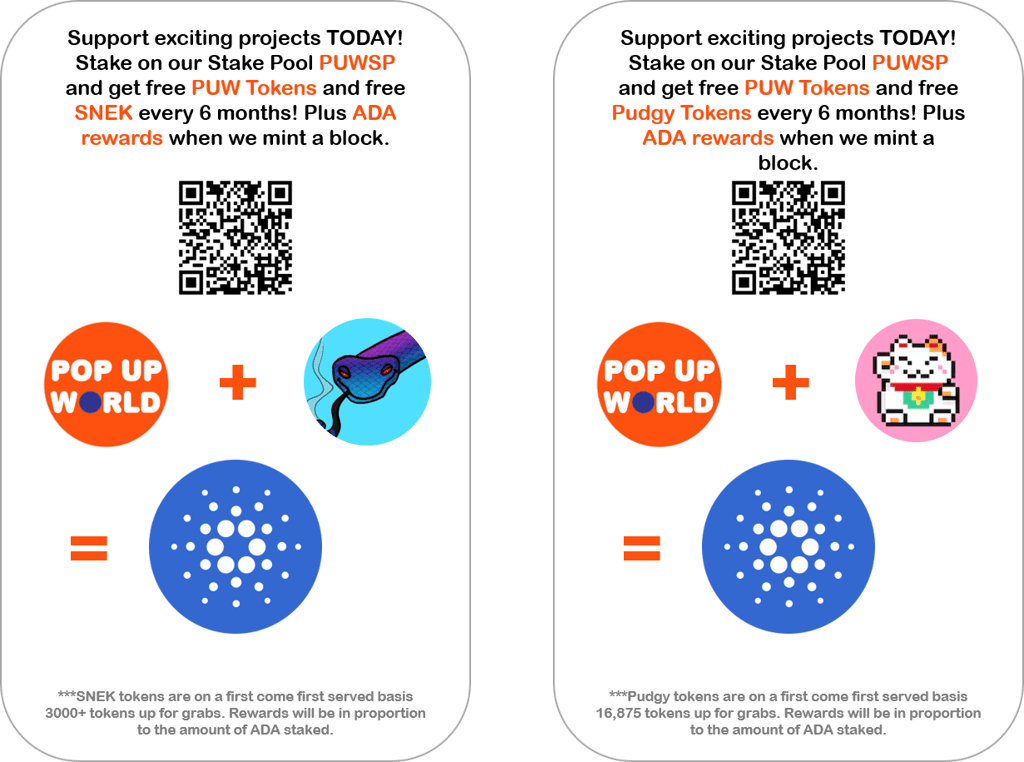
Supporters can also earn rewards by staking in the Pop Up World Stake Pool (PUWSP). Delegators to the pool receive 40% of the rewards should we mint a block. The remaining 60% will be used to support exciting new start-ups and projects on the platform. https://popupworld.co.uk/popupworldstaking
A VC is a “Venture Capitalist”. A venture capitalist utilises venture capital funds to help young companies expand. Venture capital is often used when new companies want to raise funds for their start-ups. It’s a great way to get capital to grow and expand your business.
In other words, a VC will help fund your business, and private organisations grant venture capital in exchange for a stake in your business.
Understanding VC
Venture Capital Funds
Venture capital funds a start-up without the need for the company to take out loans to fund its project. This eliminates the need for monthly repayments, therefore the start-up is free to utilise its funds in the most efficient way to grow the business.
Key pointers
● Venture Capital works to fund new start-ups and companies that are looking for funds.
● Private organisations use VC to create a stake in new start-ups.
● Venture capital has its cons, and one of them is the high risk of failure due to investing in unsuitable start-ups.
Concept of Venture Capital VC
Find an Investor
Venture capital is generated by venture capital firms, which are created by partnerships. These partners invest in the fund, which helps to expand the venture capital collectively. The funding decisions are made by a committee that helps to release funds to the preferable organisations or start-ups.
Venture capital does not always stick to funding start-ups. They are keen to fund organisations that are seeking to commercialize. The VC expects to work with the firm and expand it to generate higher profits and revenues.
What do venture capitalists look for?
What do VCs look for?
Venture capitalists engage and connect with organisations that comprise a great team and management to ensure that the organisation performs well. In addition, they seek opportunities to invest in that have large growth potential.
But why are VCs investing in these organisations?
The answer is simple! VCs are looking for huge returns, and this is only possible when a new start-up skyrockets! So yes, the returns can be massive for the VCs, and that’s the major reason that they are making an investment.
The VC firm plays an important role in determining whether to grant additional Venture Capital or not. VC funds are often created by a pool of money that is collected from other investors rather than initiating funds themselves.
Why do VCs take the risk?
Why would VCs take a risk in investing in new companies? The answer is “higher returns” ROI. Due to the high-risk VCs take, it is not uncommon for them to look at investments that will provide the potential of 10x returns or more. If a start-up shows low growth potential it’s unlikely to attract venture capital for this reason.
Which companies are part of VC?
The venture capital fund is created with a significant amount of funds. The contributors to venture capital funds are often different organisations, including insurance companies, foundations, pension funds, and other organisations seeking to maximize their investments. High-net-worth individuals can often make contributions to VC funds.
How does Venture Capital work?
A venture capital firm consists of different roles. However, a complete breakdown can help you understand the position of each role.
Associates
The associates are a part of the venture capital structure because they have a sufficient experience with finance and consultation. They also work to analyse business models and industry trends to understand which start-ups or new businesses will be fruitful for the investors and their firms. However, the associates are not involved in the decision-making processes.
Principal
A principal is generally a mid-level professional who is responsible for smooth processes and also ensures that there are no bottlenecks. However, a principal is also responsible for analysing opportunities which will help the organisation make the right decisions and negotiations.
Partners
Most importantly, partners identify areas that are better for investment. They understand which organisations can create profit and benefits and which organisations can not.
What are the types of VC?
There are three different types of VC:
Angel investors
Angel investors refer to private investors who are willing to invest in a new start-up or company to gain revenues and get equity in the business. This way, the investor can become a part of the company and share profits.
Financial VCs
Financial VCs are popular because they invest in start-ups and fund them to become larger organisations. They also create opportunities for businesses to expand and become huge giants. There are various success stories linked with financial VCs.
Strategic VCs
Strategic VCs are more concerned about organisational performance and results, and that’s why they evaluate the balance sheet of a start-up or company and then invest if they can calculate revenues and growth.
What is the most important thing in VC?
The most important thing in VC is the evaluation criteria. A venture capitalist will judge your organisation on its results and performance. They will also look for strong and thoughtful leaders who can handle tough situations. That’s why if you are a new start-up, you need to focus on your performance to obtain venture capital.
Downsides of Venture Capital
One of the main downsides of venture capital is the issue of control. A VC will want to see a large return on his investment and to achieve this there may be pressure on the founders to conform to ideas that are counter to their original strategy. VCs will want to protect their investments and any major decisions will need the ‘OK’ from the venture capitalist.
All in All
Venture capital can be a great way for start-ups to expand. However, it should be noted that VCs will want a return on their investment and often will have a say in how you run your company moving forward. The large injection of cash that a VC can provide, can catapult the start-up to new heights. Founders should be certain that VCs they choose to work with are the right fit for their future business goals.
If you enjoyed this article please remember to like and subscribe for regular entrepreneur news on Pop Up World. Feel free to visit us at https://www.popupworld.co.uk
***Disclaimer: This article is not financial advice and is given for informational and entertainment purposes only. Readers should conduct their own research and not invest more than they can afford to lose. Crypto is extremely volatile, and as such can drop in value considerably without notice.Pop Up World has a global presence and is not specifically targeting any jurisdiction with its content. Any crypto references are not intended for UK businesses or consumers.You should always seek legal advice to understand if the use or investment in crypto is allowed in your jurisdiction.
Pop Up World Token
Get the token on Cardano Decentralised Exchanges (DeXs), MuesliSwap, SundeSwap, Wingriders and Minswap. Or click the link here:
Pop Up World token has a growing ecosystem and is one to watch for the future.
You can also support this blog and exciting start-up projects worldwide by joining our Cardano Stake Pool (PUWSP). For more information go to https://popupworld.co.uk/popupworldstaking
Staking Cardano is a process where holders of the cryptocurrency (ADA) delegate their coins to receive rewards from the network. The massive advantage of staking in Cardano is your ADA never leaves your wallet. Your ADA is 100% safe. In this article we look at how this works in practice.
What is Cardano?
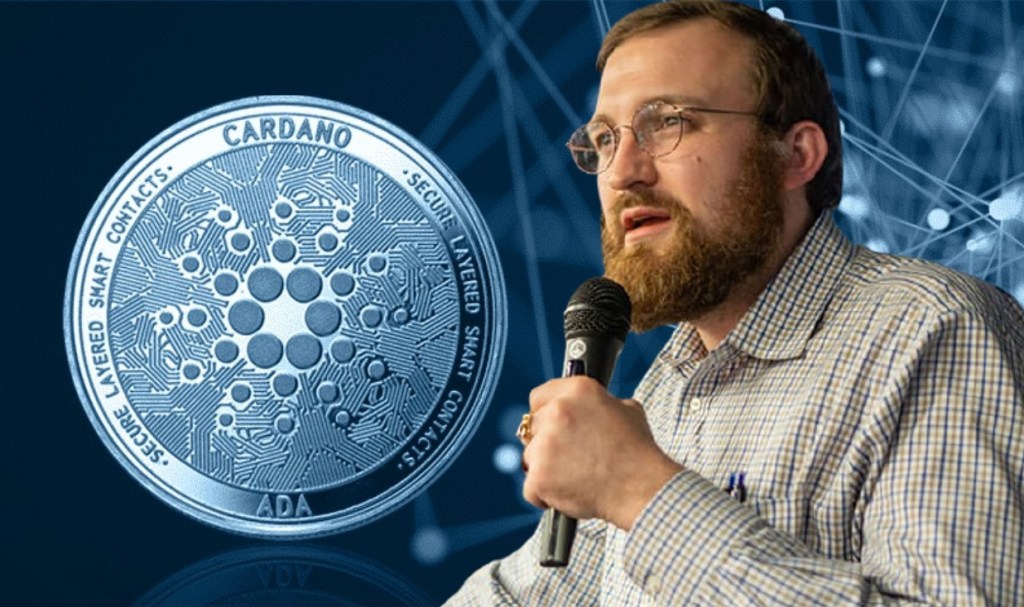
Charles Hoskinson – Cardano Founder
If you are new to cryptocurrency you are probably wondering what is Cardano? In short, Cardano is a Proof of Stake (PoS) blockchain launched in 2017 by ex-Ethereum co-founder Charles Hoskinson. Much like more established currencies such as Bitcoin (BTC), transactions are stored in a digital ledger (called a blockchain).
Unlike Bitcoin, however, transactions are not verified by CPU intensive computer ‘miners’ running complex algorithms to receive rewards. Instead Cardano considers the amount of stake (ADA) delegated to node operators (Stake Pools) to dictate the amount of rewards that can be distributed to each pool. As a result, Cardano is often considered a less power intensive crypto, with greater ‘green’ credentials.
Security
As mentioned earlier in this article, the unique feature of Cardano is that a user does not have to send their ADA crypto anywhere to delegate to a specific pool. The ADA remains in the user wallet the whole time and there’s no need to lock up your ADA for any specific period of time.
In fact, you can spend your ADA if you wish shortly after delegating. You remain in full control. You are only recording a vote or a record of your desire to stake with that particular pool. You do not need to trust the stake pool to delegate to it as you are not sending your ADA. Of course, reducing your ADA staked may mean your rewards will be reduced.
Rewards
The amount of rewards you get will depend on the individual stake pool operator. The stake pool operator will set the amount of fees and margin that is available to delegates. Each stake pool will usually advertise their current yield.
Roughly every five days (called an Epoch) the protocol will distribute 0.3% of its reserves to active pools that have successfully completed blocks on the blockchain. These rewards are shared by all delegates on each pool proportional to the amount of ADA staked.
In this way, staking is a great way to make some passive income from your ADA with practically zero risk. Typical rewards are from 0-5% per annum. Some pools offer additional rewards for staking such as additional tokens or NFTs. Usually these additional rewards will be delivered via smart contract or manually via the stake pool operator themselves. Currently Cardano has no provision to distribute native tokens via the protocol
How to Stake?
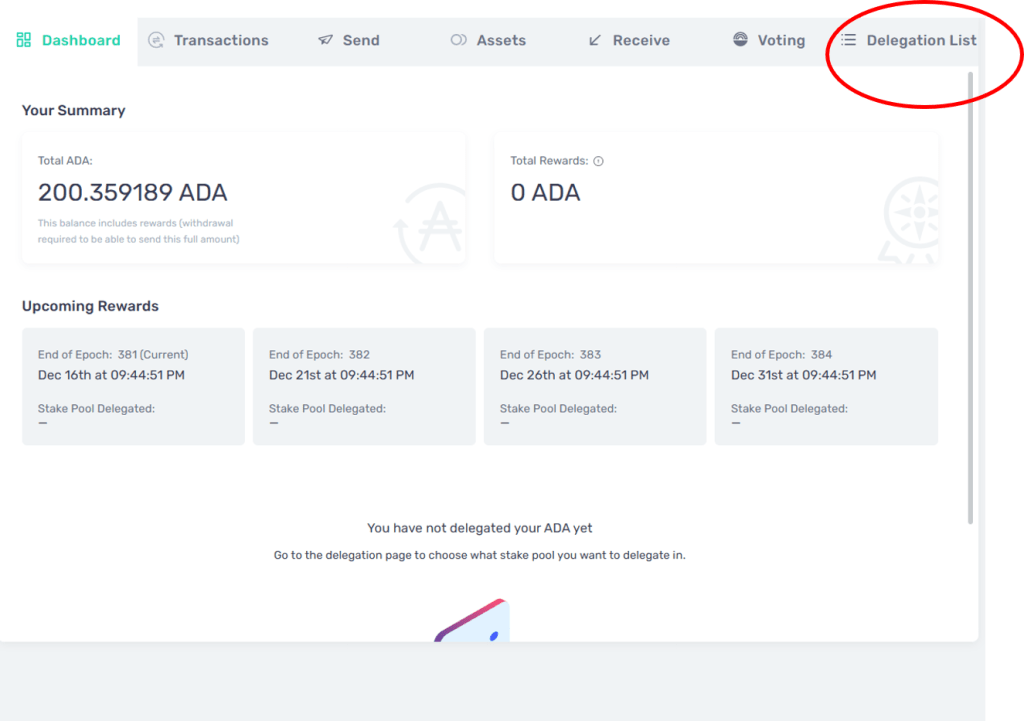
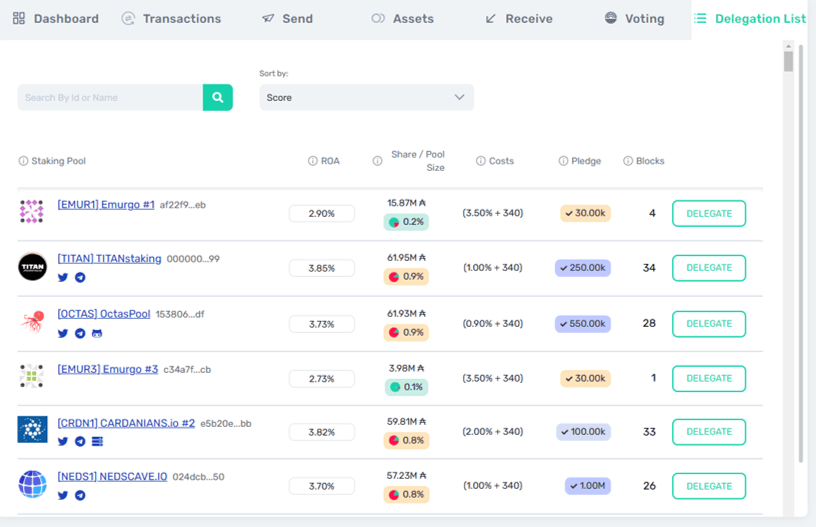
Staking on Cardano is very easy. The process is as simple as logging in to your Cardano compatible wallet such as Yoroi or Eternl, clicking on a dropdown and selecting the pool you wish to delegate to.
In Yoroi for example, simply click “Delegation’ in the top right hand corner.
It should be noted that the Nami wallet currently only allows delegation to its own pool.
The ROA (Return of ADA annualised) is displayed, as are the costs associated with each particular pool. Then, just browse or search for the pool you wish to delegate to and select ‘Delegate’ and that’s it!
Staking on a Centralised Exchange
Some centralised exchanges like Binance or Coinbase, for example, offer staking rewards via their platforms. Users should be careful of using such options as it means you will need to keep your ADA stored on that particular exchange. In this case the exchange has control of your ADA and is staking them on your behalf. If the exchange were to go bankrupt you could lose all your ADA and your rewards.
Staking on Cardano is so easy there really is no excuse not to stake directly with the stake pool operator via your wallet. That way you are 100% certain your ADA is safe since it remains in your wallet at all times.
Final Thoughts
Staking Cardano is very straight forward. Even a beginner to crypto should be able to stake their ADA with minimal risk. However, care should be taken to retain control of your ADA by only staking via the delegation list in your preferred wallet. Staking via a centralised exchange adds risk to the process as you do not retain control of your ADA.
If you enjoyed this article please remember to like and subscribe for regular entrepreneur news on Pop Up World. Feel free to visit us at https://www.popupworld.co.uk
Thanks!
Processing…
Success! You're on the list.
Whoops! There was an error and we couldn't process your subscription. Please reload the page and try again.
Pop Up World token has a growing ecosystem and is one to watch for the future.
Supporters can also earn rewards by staking in the Pop Up World Stake Pool (PUWSP). Delegators to the pool receive 40% of the rewards should we mint a block. The remaining 60% will be used to support exciting new start-ups and projects on the platform. https://popupworld.co.uk/popupworldstaking
Click here to Earn rewards by staking
***Disclaimer: This article is not financial or legal advice and is given for informational and entertainment purposes only. Readers should conduct their own research and not invest more than they can afford to lose. Crypto is extremely volatile, and as such can drop in value considerably without notice.Pop Up World has a global presence and is not specifically targeting any jurisdiction with its content. Any crypto references are not intended for UK businesses or consumers.You should always seek legal advice to understand if the use or investment in crypto is allowed in your jurisdiction.
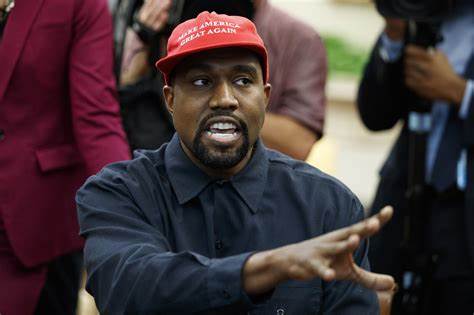
Kanye West also known as Ye is a controversial rapper come businessman that has recently been cancelled due to his antisemitic comments, including the praising of Adolf Hitler. In this article, we look at what, if anything can be learnt by entrepreneurs from the apparent downfall of the once multi-billionaire, Ye, formerly known as Kanye West.
Unfortunately, we live in an age where clicks are everything and rather than switching off, eyeballs continued to follow the car crash and implosion of Kanye West online.
A flurry of articles and YouTube videos followed the outrage and millions if not billions of clicks were generated. Social media ‘influencers’ like Kanye West, and others understand our inane need for negative stories and drama.
They understand that a negative headline will usually generate more clicks and drive more attention. In today’s digital age, attention is the new currency.
Unfortunately, celebrities like Kanye have to stoop to ever-decreasing lows to get that attention as the digital race is only won by those in the top 1% of trending topics online.
Fortunately, we do not need to go to extremes to learn from this. Headlines like, Why 90% of entrepreneurs fail”, will always do better than “Why 10% of Entrepreneurs succeed”, bear this in mind when promoting your venture.
Unfortunately, it’s just the way we human beings are wired. Most of us are averse to loss, so are more likely to respond to news that may impact us negatively rather than positively.
It’s important to understand that our words have a powerful energy. If we choose to embrace the negative aspects too much, do not be surprised if negativity follows.
Contracts are important in business
Kanye appears to be blaming the entire Jewish community for his failings as a businessperson. He claims he has been treated harshly by the business practices of members of this community.
Unfortunately, Kanye seems to forget that these individuals helped him make billions of dollars and is now aggrieved as the contracts he signed, he no longer considers appropriate.
Come on Kanye, you are better than this. If you truly have a problem with the business practices of associates or any contracts you have signed you should be prepared to prove it via the legal system and claim damages for such malpractices.
Of course, such action is likely to be expensive but if you are convinced and have the relevant evidence you should win hands down.
What can entrepreneurs learn? Firstly, ensure you have a contract for all agreements, and avoid doing business on a ‘handshake’. Secondly, read all your contracts even if you have a legal team. No point complaining after the event when you realise you have signed away your rights.
Thirdly, be prepared to take action if someone infringes the contract or goes against what was agreed. Taking action doesn’t mean you sling mud and hatred via Twitter, it means contacting the party in private to discuss the discrepancy and trying to correct the problem before any legal action takes place.
Don’t pronounce yourself a genius – even if you are one
Kanye West is no doubt a highly talented musician and gifted marketeer. However, his fixation with his self-proclaimed ‘genius’ could lead to his ultimate downfall.
We’ve seen this behaviour before, most recently from multi-billion dollar crypto failure Sam Bankman-Fried, another self-proclaimed ‘genius’ who went on to lose in excess of 20 billion dollars of user funds. We’ve also seen similar behaviour from the Theranos ‘genius’ Elizabeth Holmes, who is now looking at over a decade in prison.
Real geniuses do not parade their intelligence like badges worn to impress their peers. True geniuses observe and act to inevitably show real results. They do not orate hollow words that are designed to titillate our base emotions and short-term expectations.
Come on Kanye, how many record labels have you formed to help up-and-coming music acts? How many businesses of black origin have you invested in and nurtured? How many businesses of any origin have you invested in and nurtured? The point is real geniuses act, and change the lives of others not just their own lives or the lives of their immediate family.
What can entrepreneurs learn? Do not go into entrepreneurship just for the accolades. Your main concern should be to grow your business and make life better for your users.
Put your money where your mouth is and invest in your business and community. Of course, you need to make money but don’t make the mistake of thinking that having money instantly makes you a ‘genius’. Hubris is a mistake geniuses simply do not make.
Thanks!
If you enjoyed this article please remember to like and subscribe for regular entrepreneur news on Pop Up World. Feel free to visit us at https://www.popupworld.co.uk
***Disclaimer: This article is not financial advice and is given for informational purposes only. Readers should conduct their own research and not invest more than they can afford to lose. Crypto is extremely volatile, and as such can drop in value considerably without notice.You should always seek legal advice to understand if the use or investment in crypto is allowed in your jurisdiction.
Pop Up World token has a growing ecosystem.
Pop Up World YouTube Reviews:
Review. Malik Atif – Hindi -Urdu
Review. Inside Crypto – Hindi – Urdu
Review. Convincing Crypto – English
The Pop Up World Token is designed specifically for entrepreneurs, to store value and to utilise on our platform Pop Up World. Join the revolution in financial freedom today.
The Pop Up World Token on Cardano
Get the token on Cardano Decentralised Exchanges (DeXs), MuesliSwap, SundeSwap, Wingriders and Minswap. Or click the link here:
But does this mean crypto lies face down in the snow? The answer is probably no. Although the decimation of crypto is likely to continue in the short term, long-term prospects remain favourable, especially for established players like Bitcoin (BTC). Here’s why:
We’ve seen it before
Bear markets have happened numerous times since the launch of Bitcoin way back in 2009. In 2011 the price of Bitcoin fell from $32 to an astonishing $0.01. This dramatic fall could be attributed to the collapse of a cryptocurrency exchange called Mount Gox. The similarities are obvious. Of course, with hindsight, we know crypto rebounded dramatically following this first bear market crash.
Bitcoin has subsequently been faced with four further bear markets the most recent has seen Bitcoin plunge from all-time highs of $68,000 to under $17,000 in 2022. All other coins or altcoins tend to follow the rise and fall of Bitcoin, so if Bitcoin falls, all altcoins will fall too.
The macroeconomic climate
Interest rate rises, wars and global recessions have a contracting effect on world markets. As a result, fewer funds are sloshing around to invest in stocks and other asset classes like Bitcoin. Investors tend to gravitate towards security in recessions. The net effect is that most asset classes like Bitcoin will fall during times of recession.
Assets classes like property, gold or even fine art may rise in uncertain markets as investors flock to less risky bets. However, once the market recovers, investors will again be looking for higher returns on their investment capital.
The supply of Bitcoin is limited
Bitcoin is limited to 21 million Bitcoins. This means that in theory, as more people buy into the coin the coin becomes more scarce leading to an increase in price. Bitcoin’s creator, the mysterious Satoshi Nakamoto built this into the network deliberately to ensure that Bitcoin would be an appreciating asset. As we discussed earlier other coins are also likely to rise if Bitcoin reaches new highs.
The Bitcoin halving
Miners use powerful computers to complete cryptographic puzzles that verify transactions on the blockchain. Miners are rewarded in Bitcoin for completing such puzzles.
The Bitcoin blockchain incorporates an event called the halving. Halving effectively means that the rewards that Bitcoin miners receive for mining Bitcoin will be halved in value. The halving event occurs roughly every four years with the next occurring in 2024.
Halving has the effect of reducing the amount of new Bitcoin being produced and therefore has the effect of pushing the price of Bitcoin upwards. The final halving will be in 2140 when the maximum 21 million Bitcoins will have been produced by the blockchain.
Final thoughts
As we can see cryptocurrencies like Bitcoin have processes ‘baked in’ that should ensure the price appreciates over time. However, we should be careful to not assume that this will automatically result in an increased price.
Following the recent collapse of numerous centralised exchanges, regulation may be put in place to limit the progress of crypto.
Also, consumer confidence in crypto may wane for several months or even years due to the much-publicised bankruptcies.
As always, care should be taken when investing in crypto and you should never invest more than you are prepared to lose. Do your own research and ensure you do not hold your crypto on a centralised exchange.
Please note this article is not financial advice and is for information and educational purposes only. As always, you should carry out your own research when considering investing in cryptocurrency. Prices can go down as well as up.
If you enjoyed this article please remember to like and subscribe for regular entrepreneur news on Pop Up World. Feel free to visit us at https://www.popupworld.co.uk
Thanks!
Pop Up World Token
Get the token on Cardano Decentralised Exchanges (DeXs), MuesliSwap, SundeSwap, Wingriders and Minswap. Or click the link here:
Pop Up World token has a growing ecosystem and is one to watch for the future.
***Disclaimer: This article is not financial advice and is given for informational and entertainment purposes only. Readers should conduct their own research and not invest more than they can afford to lose. Crypto is extremely volatile, and as such can drop in value considerably without notice.Pop Up World has a global presence and is not specifically targeting any jurisdiction with its content. Any crypto references are not intended for UK businesses or consumers.You should always seek legal advice to understand if the use or investment in crypto is allowed in your jurisdiction.
Pop Up World YouTube Reviews:
Review. Malik Atif – Hindi -Urdu
Review. Inside Crypto – Hindi – Urdu
Review. Convincing Crypto – English
The Pop Up World Token is designed specifically for entrepreneurs, to store value and to utilise on our platform Pop Up World. Join the revolution in financial freedom today.
The Pop Up World Token on Cardano
Get the token on Cardano Decentralised Exchanges (DeXs), MuesliSwap, SundeSwap, Wingriders and Minswap. Or click the link here:
As cryptocurrency crashes further in this painful bear market another major player in the crypto industry has collapsed.
FTX, the second largest crypto exchange run by tech ‘whiz-kid’ Sam Bankman-Fried (SBF), who has been lauded as the next J.P Morgan spectacularly fell from grace late last week losing billions of dollars in the process.
What can we learn from all this drama?
Here goes…
The collapse of FTX and its CEO, Sam Bankman-Fried is probably the largest implosion in crypto history. It follows close on the heels of bankrupt exchanges Celsius, Voyager and others.
It’s reported that Bankman lost 94% of his wealth approximating 16 billion dollars. Customers were prevented from withdrawing from the once popular exchange late last week after the founder of Binance indicated that he would dump several millions of FTX’s tokens due to alleged financial irregularities at FTX, including alleged misappropriation of client’s funds.
This caused a major ‘bank run’ that led to liquidity problems at FTX and eventually its collapse.
Rumours of fraud at the company and a hack that drained customer wallets of millions of dollars of crypto followed leading to millions of FTX users being locked out of their wallets, and their life savings drained.
Given this situation, it’s easy to proclaim that crypto is a scam and tarnish the whole industry. Celebrity investors such as Kevin O’Leary of Shark Tank lost undisclosed sums in FTX and is publicly clamouring for regulation of the crypto industry.
O’Leary claims that he will still invest in crypto but tighter controls are needed. But is there a clear way forward for entrepreneurs and wannabe investors in crypto? What can we learn from this?
Differentiate between Centralised and Decentralised.
This point cannot be ignored. If we take a look at many of the crypto businesses that have collapsed recently; FTX, Voyager, Celsius, BlockFIand more. Do they have one thing in common? Yes, they are all centralised entities.
This is important since centralisation goes totally against the ethos of cryptocurrency. They simply attempted to create a digital version of the current financial system, where a single organisation or individual acts as custodians for your finances much like a bank.
These firms are not true cryptocurrency ventures and simply collect your crypto to gamble with on the markets with the promise of high rewards.
A true cryptocurrency venture should be decentralised, in that multiple operators should have a stake in running the blockchain and no one individual should be able to easily pump or control your assets.
The entities or individuals involved should not have direct access to your crypto and any crypto transferred to the entity should be locked in a smart contract that cannot be changed by the entity.
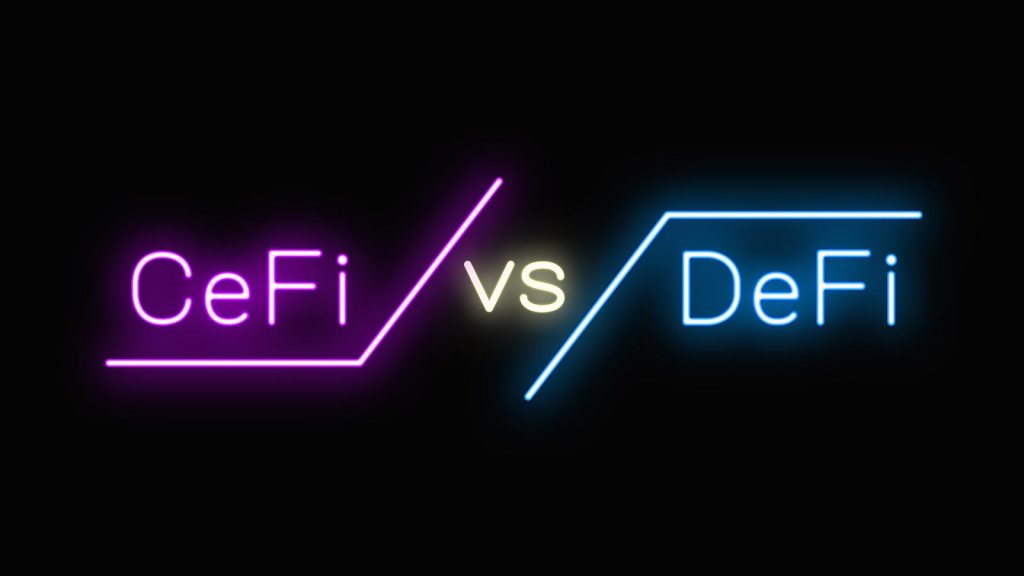
The fiasco with the above-named companies would simply not happen in a truly decentralised environment (DeFi) notwithstanding a major hack.
What can we learn? Understand the difference between DeFI (Decentralised Finance) and CeFi (Centralised Finance). Understand that centralised finance in crypto is so much riskier in an already risky marketplace. FTX, Voyager et al, are all centralised companies. DeFi is not foolproof but unless there is a major hack or flaw in the code your crypto should be safe.
Not your keys, not your crypto.
This is the mantra that is repeated over and over again. But it needs to be said once again. If you do not have the keys and passphrases to the wallet holding your digital assets, they are not yours!
It really is that simple. Set up a digital wallet to hold your crypto yourself or even better a hardware wallet, often known as cold storage.
Remember, this is the whole philosophy of crypto, that the common man and woman can take control of their finances.
Do not give that control away by simply depositing your crypto in a ‘convenient’ centralised exchange.
What can we learn?Stay clear of any centralised entities that claim to store your crypto on your behalf. The whole point of crypto is that you store your assets yourself in your own digital wallet.
Anything less is simply a disaster waiting to happen. If you insist on using centralised exchanges to purchase crypto, transfer out those assets immediately.
Do your own research.
YouTubers such as Graham Stefan , Andrei Jikh and others are coming under heavy fire for promoting FTX and other bankrupt exchanges such as BlockFi.
These YouTubers are heavily sponsored by companies and are not operating in your best interests. If a great project comes along they are unlikely to promote it unless there is a huge fee attached.
They pump companies for a fee (sponsorship) and claim that they care for their subscribers but it’s clear they do minimal research and there is an obvious conflict when large sponsorship fees are available.
Yes, these guys need to make a living, we get it but you should not trust your life savings on the advice of a YouTuber, that is simply financial suicide.
A simple search on Sam Bankman-Fried in Google will show that the so-called ‘genius’ has done nothing notable prior to FTX.
How does someone with no history of entrepreneurship create a billion-dollar business in 3 years? That alone should be a major red flag. Where exactly did his money come from?
Another search on Daniel Friedberg an executive at FTX, shows he was linked to an online poker scandal, Ultimate Bet’s in 2008.
What can we learn?Google is your friend. Research any founders and key people. Simply typing their name in Google and looking back in history should give you a timeline of any of the founders.
Go back a couple of years to find out if they have any history prior to the new venture. If not why not? It’s practically impossible to do anything of note and not have any press, articles or news these days.
Do not rely on LinkedIn or social media as rogue founders can post whatever information they want there.
Final thoughts
If you have invested and lost money in any of the failed crypto companies mentioned we are truly sorry.
Remember, the philosophy of cryptocurrency is that you should retain control of your funds at all times. Please do not beat yourself up too much if you have lost money on FTX.
Heavyweight institutional investors such as NEA, IVP, Iconiq Capital, Third Point Ventures, Tiger Global, Altimeter Capital Management, Lux Capital, Mayfield, Insight Partners, Sequoia Capital, SoftBank, Lightspeed Venture Partners, Ribbit Capital, Temasek Holdings, BlackRock and Thoma Bravo have all seen their investment in FTX go to zero.
If crypto is to thrive we need to do better and invest in projects that are genuinely great projects and not invest in projects that are all hype and empty promises.
If you enjoyed this article please remember to like and subscribe for regular entrepreneur news on Pop Up World. Feel free to visit us at https://www.popupworld.co.uk
Thanks!
Start-Up Manual – Business Zero To Superhero – by Graham Jules
***Disclaimer: This article is not financial advice and is given for informational and entertainment purposes only. Readers should conduct their own research and not invest more than they can afford to lose. Crypto is extremely volatile, and as such can drop in value considerably without notice.Pop Up World has a global presence and is not specifically targeting any jurisdiction with its content. Any crypto references are not intended for UK businesses or consumers.You should always seek legal advice to understand if the use or investment in crypto is allowed in your jurisdiction.
Pop Up World YouTube Reviews:
Review. Malik Atif – Hindi -Urdu
Review. Inside Crypto – Hindi – Urdu
Review. Convincing Crypto – English
The Pop Up World Token is designed specifically for entrepreneurs, to store value and to utilise on our platform Pop Up World. Join the revolution in financial freedom today.
The Pop Up World Token on Cardano
Get the token on Cardano Decentralised Exchanges (DeXs), MuesliSwap, SundeSwap, Wingriders and Minswap. Or click the link here:
Pop Up World token has a growing ecosystem and is definitely one to watch for the future.
Please note this article is not financial advice and is for information and educational purposes only. As always, you should carry out your own research when considering investing in cryptocurrency. Prices can go down as well as up.
Not many entrepreneurs realise that all the effort they’ve put into developing their brand can be destroyed by one mistake, particularly one involving the brand name they choose. Undoubtedly, choosing an inappropriate brand name is among the worst things you can do to your company.
This is because your brand’s personality is formed and shaped by your company name. Therefore, you must ensure your brand’s name appropriately conveys your business’s principles.
The good news is that you can quickly choose a catchy name for your brand by using a brand name generator, name crowdsourcing, or brainstorming.
But whichever naming strategy you use, be careful and steer clear of the following naming blunders that can easily damage the reputation of your business.
Easily Misunderstood Names
Customers are more likely to purchase from a business if it shares similar political, cultural, and environmental views. And it’s no secret that the average person has strong opinions on delicate social topics and is likely to keep buying from a business that feels the same way.
And although lots of entrepreneurs are embracing edgy marketing, if your company decides to focus on these issues, even if it’s in your company’s promotions or messaging like Gillette, you’ll eventually end up excluding a significant portion of your core audience because people who oppose the causes you actively support are always less likely to buy your goods or use your services.
Avoid using names like ‘Spank Me Santa Lipstick,’ ‘Druggie,’ or ‘Pee Cola’ when choosing your brand or product names since they are likely to evoke negative images in the minds of your target audience.
Extremely Long Brand Names
We urge businesses to avoid names like ‘WeAretheSuperlativeConspiracy,’ ‘Troglodyte Homunculus,’ ‘Aeropostale,’ and ‘Euymhod,’ as these words are unnecessarily difficult for the average customer to easily pronounce or remember when surfing the web.
Picking a long or complex name will affect your brand’s referral because many customers will struggle to remember your company’s name, and that’ll affect whether they’ll recommend it to their friends and family. If you must pick a lengthy name, consider abbreviating it, like H&M, EOS, IBM, and 3M did.
Make it your main priority to come up with short, distinctive, and memorable names for your company because 80% of customers forget about brand names within three days. Not to mention that short and unique names capture clients’ attention more quickly than long, intricate ones.
Weird Translations
Establishing a captivating online presence for your company can allow customers from all over the world to contact and engage with your brand. Nevertheless, it has its downsides. Choosing a brand name with a different meaning in a foreign language is one of them.
And that’s because if your company’s name is insulting in the local language of your target market, your potential clients will be reluctant to use your goods or services. This was demonstrated when two well-known products, Mazda’s Laputa and Nokia’s Lumia, were rejected by Spanish-speaking customers because their names, respectively, translated to ‘prostitute’ in Spanish.
When searching for the best name for their company, business owners shouldn’t limit their linguistic research to just one language. Make sure you only choose a brand after conducting a comprehensive analysis across the main languages in the industry you’re aiming to penetrate as well as the key languages spoken around the world.
Choosing a name with a pleasant translation will ensure that your selected name will be well-liked by your global customers.
Prioritise Your Clients
Companies that put profit front and centre instead of their audience soon lose customers because no one wants to do business with a company they believe is not interested in creating modern and unique solutions to their problems.
The ideal method to position your brand is to choose a name that has been tested thoroughly, has positive connotations in the language of your target market and is easy to say and find online. If you pick a superb name, you won’t need to rename your business after a few years.
Grant Polachek is the head of branding for Squadhelp.com, 3X Inc 5000 startup and disruptive naming agency. Squadhelp has reviewed more than 1 million names and curated a collection of the best available names on the web today. We are also the world’s leading crowdsource naming platform, supporting clients from early-stage startups to Fortune 500 companies.
If you enjoyed this article please remember to like and subscribe for regular entrepreneur news on Pop Up World. Feel free to visit us at https://www.popupworld.co.uk
Start-Up Manual – Business Zero To Superhero – by Graham Jules
Read about the full ‘Alien Agenda’ in an exciting Sci-Fi – Illustrated Screenplay Format Book – Limited edition copies available on Amazon. Virtual Heaven (Back to Reality) – by Graham Jules.
Virtual Heaven (Back to Reality) – By Graham Jules – The Secret Agenda Confirmed
***Disclaimer: This article is not financial advice and is given for informational and entertainment purposes only. Readers should conduct their own research and not invest more than they can afford to lose. Crypto is extremely volatile, and as such can drop in value considerably without notice.Pop Up World has a global presence and is not specifically targeting any jurisdiction with its content. Any crypto references are not intended for UK businesses or consumers.You should always seek legal advice to understand if the use or investment in crypto is allowed in your jurisdiction.
Pop Up World YouTube Reviews:
Review. Malik Atif – Hindi -Urdu
Review. Inside Crypto – Hindi – Urdu
Review. Convincing Crypto – English
The Pop Up World Token is designed specifically for entrepreneurs, to store value and to utilise on our platform Pop Up World. Join the revolution in financial freedom today.
The Pop Up World Token on Cardano
Get the token on Cardano Decentralised Exchanges (DeXs), MuesliSwap, SundeSwap, Wingriders and Minswap. Or click the link here:

































 Pop Up World Blog