
Launching your brand new company need not be difficult and starting as a fully registered business has numerous advantages. Businesses launched as a limited company enjoy the benefits of limited liability and the option of easy allocation of shares, handy if you are looking to attract investors for example. If you wish to launch your new business as a registered entity, read on!
If you are unsure as to all the pros and cons of starting your own registered company please read the article here. In this article, we will be diving right in and forming a Limited company using the Pop Up World Company Formation app
Step 1.
Go to the Pop Up World homepage and click on Company Formation

Step 2.
You will see a Search box. Enter the name of your proposed company to check if it is available and click the Search Button.

Step 3.
If the company you searched for is available you will get the following page, if your company name is not available you will be redirected to try again.

Next, you need to choose your required payment option.
a) If you are a UK Company Director – Choose option 1 in the drop-down (£17)
b) If you are a Non-UK Company Director – Choose option 2 in the drop-down (£49).
Next, you need to enter your Full Name, this has to be your real name as seen on your official ID.
Then, your Email Address and a Password. If you are interested in UK Business Banking tick the box.
Then click Submit.
You will need to pay in full in order to continue with the company formation.
Click Buy Now to pay in full

Step 4.
Once your payment has been accepted you will be forwarded to the Registered Address page.
Next, enter your Company Registration Address. This address is important and is where all official documentation will be delivered. You can use your home address or business address but bear in mind this address will be published in the public record on the Companies House website and will be available publicly.

Step 5.
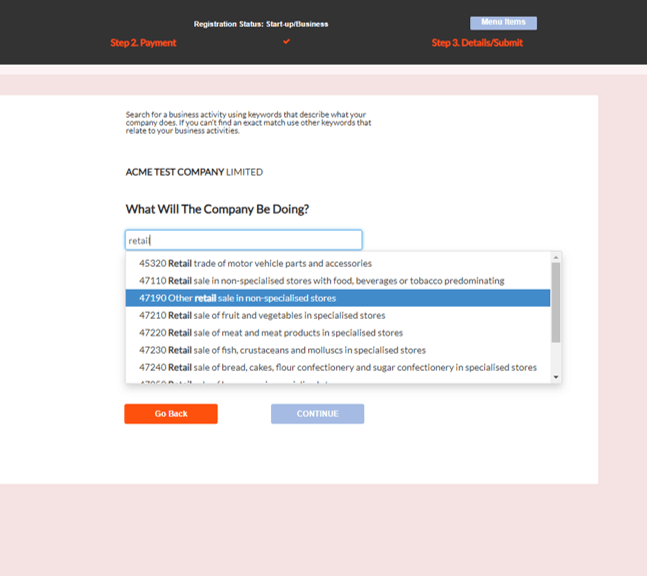
Next, enter your Business Activity. Start typing and select from the options. Then click Continue.
Step 6.
Next, enter the Director’s details.

You will need to enter. Your First Name and Surname if you are the founder.
Your Date of Birth
Your Nationality
Your Country of Residence
Your Job Title
Then click Continue
Step 7.
Next, enter your Residential Address. This is where you live. Your residential address will not be made available in the public record unless it is the same as your Company’s Registered Address you entered earlier. Tick the box to confirm that the person named agrees to become a director of the company you are forming.
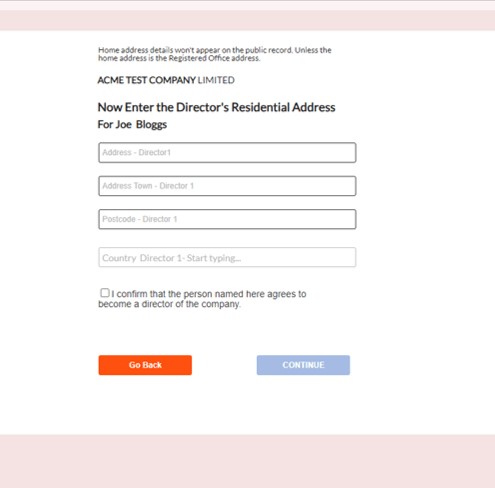
Click Continue.
Step 8.
Next, you can add Another Director if required. If you select YES. you will be prompted to enter the Full Name and Address details of the additional director.
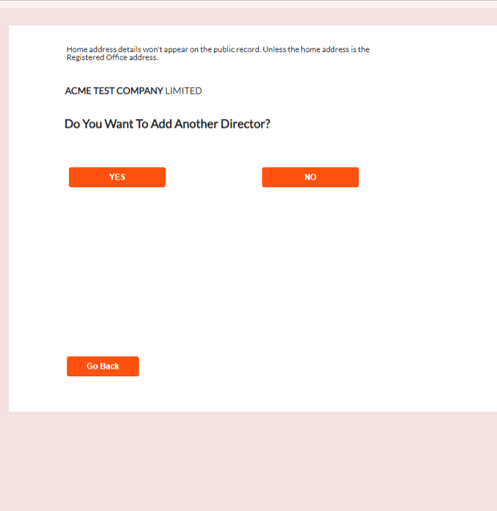
Select NO if you are the sole director.
Step 9.
Next, enter the shareholder details. This is the amount of shares you wish to allocate to each director. For example, if you have 2 directors you may want to issue 2 shares with each director holding 1 share each (or 50% of the company each). If you are the sole director you can select 1 share (100% of the company).
You should assign the shares to reflect the proportion of the company you wish to assign to each director.
Select from the drop-down the Number Of Shares you wish to assign to the director named.
Shares allow the holder to share in company profits and vote on company decisions.
Remember, you can change the shareholding at any time. For example, if you take on investors or if you want to add co-founders and need to give them a stake in the business.

Click Continue when completed.
Step 10.
Next, choose your Share Value. The share value is in British Pounds. Shareholders must pay the company the value of all the shares they own. Choosing a low share value means they’ll pay less. If the company is closed down the directors will only be liable for the share value they own. If you choose £1 for your share value the director will only be held liable for £1. (Excluding fraud or any personal guarantees the director has made).

Click Continue when completed.
Step 11.
Next, you will need to confirm all the Persons of Significant Control (PSC).
A Person of Significant Control is anyone who holds more than 25% of the company’s shares. If you have more than one director holding shares you will need to confirm if they are a PSC.
If you are a sole director you will have full control (100%). There select Yes, in the drop-down.
Tick the box to confirm you understand the PSC will be listed in the public record and the person listed has control of the company.

Click Continue.
Step 12.
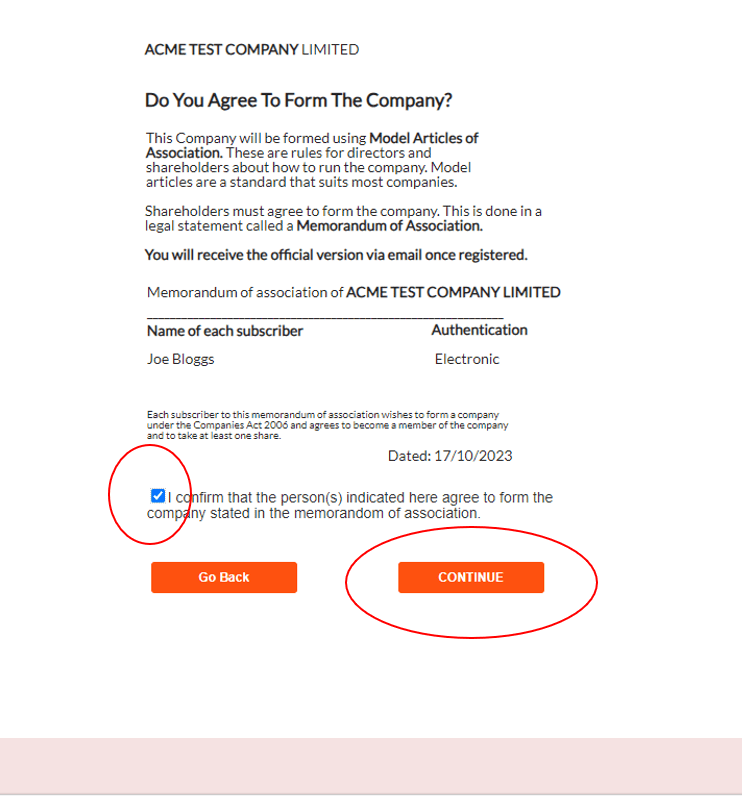
Next, you will need to confirm to Agree To Form The Company. Tick the box to confirm.
Once the company is formed you will receive a Memorandum of Association, a legal document showing the agreement to form the company.
Step 13.
Next, you will need to Sign and Submit the company formation. Note that once you submit this the application cannot be changed. Tick the box to confirm you understand.

Click Submit
Step 14.
And that’s it!
You will receive your Certificate of Incorporation (It’s like a birth certificate for your company) and your Memorandum of Association digitally. Click the Green Button to access your documents. Allow up to 24 hours to receive your Certificate of Incorporation.

If you expressed interest in setting up a Business Account click the orange button and you will be redirected to a partner site to set one up there.
Congratulations! You have formed your limited company. We wish you all the best on your journey!
***It’s important to note that forming your own company comes with various legal obligations. This article is not legal or financial advice. You should seek advice from a qualified professional if you are unsure of what you are doing.
Pop Up World – How Does It Work? – Article
Pop Up World YouTube Reviews:
Review. NFTsGuide – English
Review. Crypto Flo – English
Review. Crypto Universe – English
Review. Malik Atif – Hindi -Urdu
Review. Inside Crypto – Hindi – Urdu
Review. Crypto FLO – Portuguese
Review. Convincing Crypto – English
The Pop Up World Token is designed specifically for entrepreneurs, to store value and to utilise on our platform Pop Up World. Join the revolution in financial freedom today.
Thanks!
It starts with an idea. Pop Up World is a platform that helps start-ups and small businesses reach for the stars. No matter what size you are. Use our start-up guide Business Zero to Superhero, Design your Logo. Connect with investors via our Investor Connector. You can start a Website and Domain name. You can Search for and promote your Premises. You can promote your idea for free on our Pop Up World Ads site, you can even form a Limited Company You can also join us on our journey via the Pop Up World Token (PUW).
 Pop Up World Blog
One thought on “Online Company Formation – Using The Pop Up World App”